
Cincinnati.com: The Enquirer
USA TODAY Co.News & Magazines
2.6258.00 Reviews
- Version
- 8.10.3
- Installs
- 50.00K
- Age Rating
- Everyone 10+
Screenshots




Our Review of Cincinnati.com: The Enquirer
 Analysis by Appyee
I judge a local-news app less by how many sections it can display than by whether it helps me answer practical questions quickly: what has changed nearby, what deserves a closer read, and what can wait until later. Cincinnati.com: The Enquirer is aimed squarely at readers who want Cincinnati coverage in one place, with news, sports, weather, and entertainment as its central concerns. For someone who follows the city from day to day, that local focus is its clearest reason to open it.
Quick checks and slower reading
My expectation for speed is modest but important: a news app should get me to a useful headline without making a short check feel like a project. The Enquirer’s straightforward layout is suited to that kind of visit. I can browse a topic, choose a story, and decide whether it is relevant without first working through a complicated interface. That matters when I’m checking the news between errands rather than settling in for a long read.
A brief visit and an extended one are different tests. When I want to scan local developments, the app’s topic-based browsing gives me a route through the material; when I have more time, articles and multimedia make it possible to stay with a story. I would not treat a quick headline scan as a complete account of a complicated issue, though. For major decisions or fast-moving events, I’d read the full coverage and compare it with other reliable reporting.
A useful place in a Cincinnati routine
A realistic use is checking the app over breakfast, then returning after work to see whether a local story has developed. That split is more practical than expecting one session to cover everything. A commuter might use it to catch up on city news before leaving home, while a sports follower can make a separate visit when local teams are the priority. Weather coverage also gives the app a role in planning the day, though I’d still check conditions close to the time I need to act.
It is a particularly natural fit for people who live in Cincinnati or have family, work, or regular plans there. Someone who has moved away but still cares about the city may find local reporting more useful than a national news feed that gives the area little attention. By contrast, readers looking mainly for international coverage, broad investigative reporting across many regions, or a general-purpose news aggregator may be better served by a larger outlet or an app that combines publications.
What happens when I use it heavily
News habits can become demanding: a person may check headlines several times a day, open a long article, watch a clip, and then return later for another update. The app’s mix of written stories and media makes those different ways of following coverage possible. The trade-off is that multimedia can take more time and data than simply reading text, so I’d save video or audio for a moment when I have a stable connection and can give it attention.
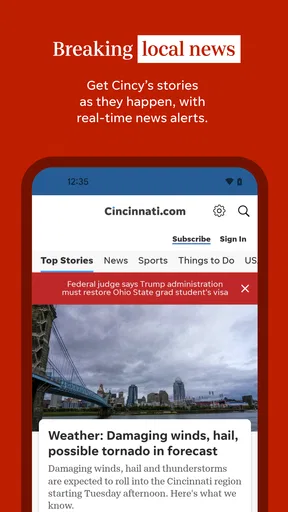
Notifications are best treated as a filter, not a substitute for browsing. I’d choose only the subjects or breaking-news alerts I genuinely want, then use the app itself when I have time for a broader scan. That keeps an alert from turning into a stream of interruptions and makes each one easier to judge. If a topic stops mattering, changing the selection is more sensible than letting unwanted alerts build up.
Reliability, interruptions, and recovery
Local coverage is most valuable when a reader can return to it consistently, but no single app should be the only route to urgent information. If a story is still developing, I’d reopen it later rather than assume the first item I saw is the final word. If a page or piece of media does not load as expected, a practical fallback is to retry when the connection is better or read the text instead of waiting on a video. Those are ordinary ways to keep a news routine useful without assuming every session will be uninterrupted.
Compared with a newspaper website in a browser, a dedicated app can make repeated visits feel more direct and keep local topics close at hand. A broad news aggregator may be better for comparing many outlets in one feed, but it can give Cincinnati less prominence. The choice comes down to focus: I’d use The Enquirer when local context is the point, and a broader source when I want a wider national or international view.
Device fit and access choices
The app is free to download, and it is published by USA TODAY Co. Its current version is 8.7.1, and it requires Android 8.0 or later. That makes the operating-system requirement worth checking before installation, especially on an older phone. The age rating is Everyone 10+, which is useful context for families deciding whether the app belongs on a shared device.
There is also a meaningful difference between installing the app and paying for content. In-app purchases range from $19.99 to $69.99 per item, so I would look carefully at the terms shown in the app before committing. The average rating is 2.6 from 527 ratings, and the app has 50K+ installs; those figures suggest it is worth approaching with realistic expectations rather than assuming a perfect experience. I’d first see whether its local coverage and reading experience suit my routine, then decide whether any paid access makes sense for me.
Who will get the most from it
The strongest case for this app is a reader who wants Cincinnati reporting to be a regular part of the day, not just an occasional search result. It can also help a visitor get oriented around local topics and events, although I would not rely on a news app alone for navigation or time-sensitive logistics. For an occasional reader, the free access may be enough to sample the experience; a person who regularly hits paid material should weigh the cost against how often they actually read it.
One useful habit is to separate discovery from verification. I’d use the app to notice a local issue, then read the article carefully and check other sources if the details matter to a decision. Another is to treat notifications as prompts to investigate, not as complete summaries. These small choices make a local-news app more helpful while reducing the chance that a headline or alert becomes the whole story.
Keeping Up with Local News and Events
One of the standout features of Cincinnati.com: The Enquirer is its comprehensive coverage of local news. The app does a fantastic job of breaking down major headlines into digestible stories. I found myself easily navigating through categories like politics, sports, and entertainment. It’s like having a digital newspaper in your pocket but way more interactive.
The events section is also a nifty feature. It lists everything from concerts to community gatherings, so you’ll never miss out on what’s happening around town. There’s even a section for local restaurant reviews, which is perfect for foodies looking to explore Cincinnati’s culinary scene.
User-Friendly Interface
Let’s talk about the interface. It’s clean, intuitive, and easy on the eyes. The design is straightforward, ensuring that even the least tech-savvy among us can navigate it with ease. Articles load quickly, and there’s minimal lag—a huge plus when you’re on the go and need information fast.
I appreciated the option to customize notifications. You can choose to receive alerts on breaking news or specific topics of interest. It’s a great way to stay informed without feeling overwhelmed by information overload.
Interactive Features and Multimedia
One of the things I loved most about this app is its multimedia integration. It’s not just about reading articles; you can watch videos, view photo galleries, and even listen to podcasts directly within the app. This adds a dynamic layer to the news consumption experience, making it more engaging.
The interactive map feature is pretty cool too. It helps you locate events and news hotspots around the city. You can zoom in on areas of interest, which is especially handy if you’re planning to attend an event and need directions.
Subscription and Access
The app offers a mix of free and premium content. While you can access a decent amount of content without paying, the premium subscription unlocks exclusive articles and deeper insights. For heavy news consumers, the subscription is worth considering as it supports quality journalism and keeps the app ad-free.
Signing up for the premium version is straightforward, and the app guides you through the process seamlessly. Plus, there are often promotional offers for new subscribers, making it a great time to jump in.
Community Engagement
Cincinnati.com: The Enquirer isn’t just about passive reading. The app encourages community engagement through its comment sections and social media integration. I found the comment sections particularly interesting—users can discuss articles and share opinions, adding depth to the stories.
Additionally, sharing articles on social media is just a tap away. It’s a great way to keep your friends and family in the loop about local happenings.
All in all, Cincinnati.com: The Enquirer is a must-have app for anyone looking to stay informed about Cincinnati. It’s user-friendly, packed with features, and offers a rich multimedia experience. Whether you’re interested in news, events, or local culture, this app has something for everyone. So, if you haven’t already, give it a download and see for yourself how it keeps the Queen City at your fingertips!
My performance verdict
For the job it sets itself—bringing Cincinnati-focused reporting to a phone—the appeal is convenience and local relevance, not replacing every other news source. I’d keep it in my routine if I wanted regular updates about the city, and I’d use its alerts selectively so they remain helpful. Readers who want a single feed spanning many regions, or who rarely follow Cincinnati news, may find a general news app or a browser more efficient. For a local reader, it is worth trying with a clear sense of what you want from it and a careful look at any paid access before subscribing.
Verdict
Strengths of Cincinnati.com: The Enquirer
- Comprehensive local news coverage
- User-friendly interface
- Regular updates and notifications
- Customizable news feed
- Access to exclusive content
Limitations of Cincinnati.com: The Enquirer
- Occasional ads may disrupt reading
- Requires subscription for full access
- Limited offline reading options
- Some users report slow loading times
- Notifications can be overwhelming
Other Releases by USA TODAY Co.
View All
IndyStar: Indianapolis Star
News & Magazines2.7

AZ Central: Arizona Republic
News & Magazines2.5

The Detroit News: Local News
News & Magazines3.1

Detroit Free Press: Freep
News & Magazines3.0
Similar Picks in This Category
View All
Google News - Daily Headlines
Google LLC4.0

X
X Corp.4.8

Flipboard:Your Social Magazine
Flipboard3.4

Opera News: breaking & local
Opera4.5

Hindi News by Dainik Bhaskar
Dainik Bhaskar Group4.0

Way2News Daily News App
Way2News ( Formerly Way2SMS )4.6
Frequently Asked Questions
What features does the Cincinnati.com app offer?
The Cincinnati.com app provides users with up-to-date news coverage, live sports updates, weather forecasts, and personalized notifications. It also includes access to exclusive content and multimedia features such as videos and photo galleries. Users can customize their news feed based on their interests and follow specific stories or topics.
Is the Cincinnati.com app free to download and use?
Yes, the Cincinnati.com app is free to download on both Android and iOS devices. However, while many features are accessible for free, some premium content may require a subscription. Users should check the app for any in-app purchase options or subscription details for full access.
How does the Cincinnati.com app handle user privacy and data security?
The Cincinnati.com app prioritizes user privacy by implementing robust security measures to protect personal data. It complies with industry standards for data protection. Users can review the app's privacy policy for detailed information on how their data is collected, used, and stored. Always ensure your app version is up-to-date for the latest security features.
Can I customize my news feed in the Cincinnati.com app?
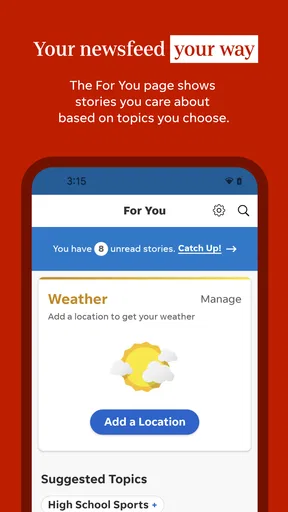
Yes, the Cincinnati.com app allows users to customize their news feed to better match their interests. You can select specific topics, categories, and follow stories to receive relevant updates. This feature enhances user experience by providing a tailored news section based on personal preferences.
Does the Cincinnati.com app work offline?
The Cincinnati.com app requires an internet connection to access the most current news and updates. However, some articles and content may be available for offline reading once they have been downloaded. Users should ensure they have a stable connection for optimal functionality and to access the latest information.
